
Most small businesses in Yerevan start with leads scattered across Telegram chats, Instagram direct messages and a notebook. Sending website leads to Google Sheets fixes the first problem: every request from the site lands in one shared table, with a date, a source and a status. It is free, everyone on the team already knows how to use it, and it works well as a starter CRM until you outgrow it.
How it works
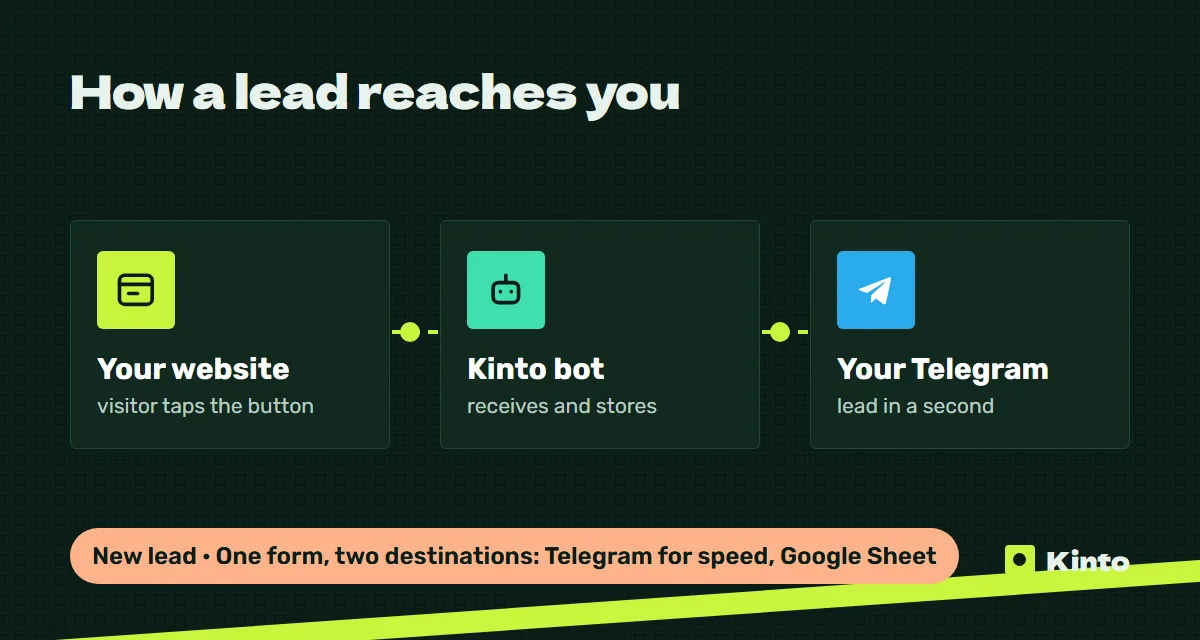
When a visitor fills in a form on your website, two things happen at once:
- A Telegram message goes to the manager or a team chat, so someone can call back within minutes. We describe this in detail in website leads to Telegram.
- A new row is added to a Google Sheet with all the form fields plus technical data: the page the form was on, the date and time, and the traffic source.
Telegram is for speed. The sheet is for memory. A chat scrolls away after a busy day, while the sheet keeps every lead in order and lets you filter, count and check who handled what.
Columns worth having from day one
Do not copy a 30-column template. Start with what the team will actually fill in.
| Column | Filled by | Why it matters |
|---|---|---|
| Date and time | Automatically | Shows response speed and busy days |
| Name, phone | The form | Contact details |
| Service or product | The form | What the person asked about |
| Page | Automatically | Which page brings requests |
| Source | Automatically, from UTM tags | Which ad or post the lead came from |
| Status | Manager | New, in progress, won, lost |
| Owner | Manager | Who is responsible |
| Next step and note | Manager | What was agreed and when to follow up |
The automatic columns are the most valuable ones, because nobody has to remember to fill them. If you run ads or post links in Instagram and Telegram, add UTM tags to every link and the source column fills itself.
Simple rules that keep the sheet useful
- One row per request. Do not merge or delete rows. If a client writes twice, that is two rows, which is fine.
- A fixed list of statuses. Use a dropdown so nobody types "in work", "working" and "WIP" for the same thing.
- Color by status. Conditional formatting makes new and forgotten leads visible at a glance.
- A weekly look. Once a week, filter by "new" older than two days. Those are the leads you are losing.
- Company ownership. Create the sheet under a business Google account, not an employee's personal email. When someone leaves, you remove their access and keep the data.

What you can see after a month
Even a basic sheet answers questions most owners only guess at:
- How many requests came from the website this month, and on which days.
- Which pages and services bring the most requests.
- Which ad campaign or post brought leads, if links carry UTM tags.
- How many requests turned into sales, if managers keep the status column up to date.
- How long it takes the team to respond.
These are your own numbers from your own sheet, not industry averages, and they are the basis for decisions about ads and content.
When a sheet is no longer enough
Google Sheets works while the team is small and the process is simple. Signs it is time for a proper CRM:
| Sign | What a CRM adds |
|---|---|
| Managers forget follow-ups | Tasks and reminders with dates |
| Several people edit the same rows | Clear ownership and change history |
| Leads come from site, bot, Instagram and calls | One card per client with all channels |
| You need a sales funnel by stage | Pipelines and conversion by stage |
| The sheet has thousands of rows and is slow | A database built for it |
The move is easy if the sheet was tidy. Most CRMs import a CSV, and consistent columns map one to one. See CRM integration for how we connect sites, bots and CRMs.
Cost and timing at Kinto
| Setup | What you get | Price |
|---|---|---|
| Landing page with lead form | Form, Telegram alerts | from $700, about 6 days |
| Website with sections | Several forms, Telegram alerts | from $1,800, about 12 days |
| Leads to Google Sheets or CRM | Automatic rows or cards with source data | from $700 |
| Analytics setup | Goals for forms and buttons | from $500 |
Prices are fixed in the contract before work starts. Full details are on the pricing page.
Common mistakes
- Only the sheet, no alert. Nobody watches a spreadsheet all day. Without a Telegram notification, leads wait for hours.
- Too many required fields in the form. A long form gives you a tidy sheet and fewer leads. Ask for name and phone, collect the rest on the call.
- No source column. Without it you cannot tell which ads are worth the money.
- Personal accounts. A sheet that belongs to a manager's personal Gmail leaves with that manager.
Next step
Tell us how leads reach you today and who handles them. Write to @kinto_am on Telegram or leave a request through the form, and we will suggest the simplest setup that fits your team. More about our approach on the website development page.
Updated: 2026-10-15