When a client receives an offer from yoursalon.yerevan@gmail.com and another from info@yoursalon.am, the second one looks like a company. Custom domain email is a small detail, but it affects trust, deliverability and control over your business communication. This guide explains how it works, how to set it up and what to avoid.
Why switch from Gmail
- Trust. An address on your domain shows that the business is real and established.
- Consistency. The website, the email and the business cards all use the same name.
- Control. When an employee leaves, the mailbox stays with the company. With personal Gmail accounts, the client history leaves with them.
- Roles. Addresses like info@, sales@ or booking@ can be passed between people without changing what clients see.
- Deliverability. With correct DNS records, your letters are less likely to land in spam.

What you need
- A domain registered to your business, for example yourname.am. See the .am domain guide.
- A mail provider that hosts the mailboxes.
- Access to DNS settings of the domain, to connect the provider.
Choosing a provider
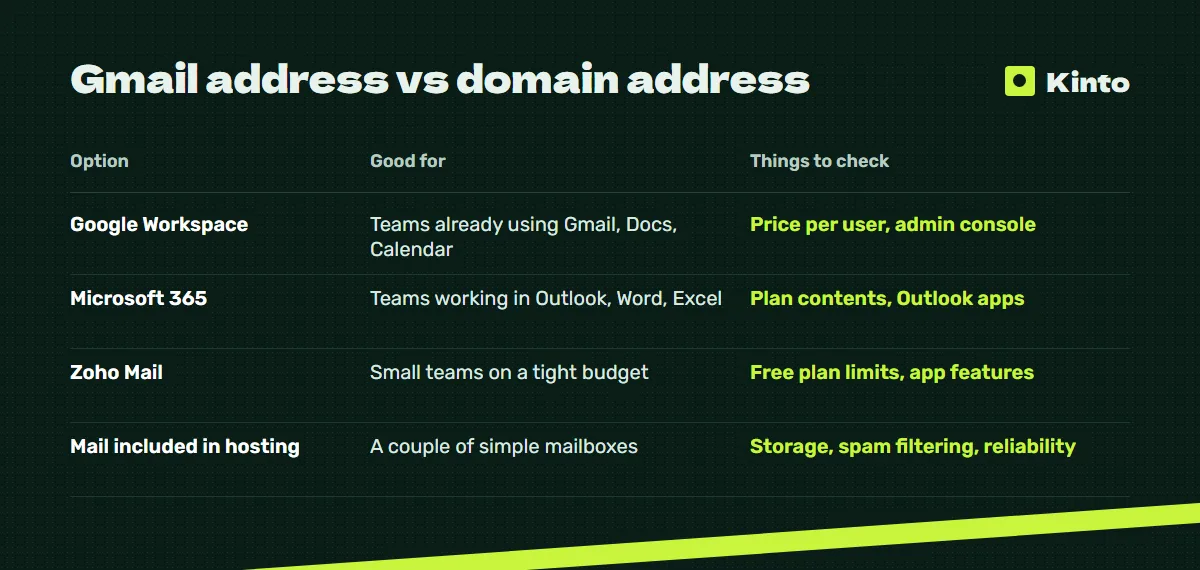
| Option | Good for | Things to check |
|---|---|---|
| Google Workspace | Teams already using Gmail, Docs, Calendar | Price per user, admin console |
| Microsoft 365 | Teams working in Outlook, Word, Excel | Plan contents, Outlook apps |
| Zoho Mail | Small teams on a tight budget | Free plan limits, app features |
| Mail included in hosting | A couple of simple mailboxes | Storage, spam filtering, reliability |
Prices and plans change, so check the current terms on each provider's site. For a small business, the key decision is usually which apps the team already uses every day.
DNS records that keep you out of spam
These records are added in your domain's DNS settings:
| Record | What it does |
|---|---|
| MX | Tells the world which server receives mail for your domain |
| SPF | Lists the servers allowed to send mail from your domain |
| DKIM | Adds a digital signature that proves the letter was not changed |
| DMARC | Tells receiving servers what to do with letters that fail the checks |
Many businesses set up MX and stop. Mail arrives, but outgoing letters land in clients' spam folders. All four records should be in place. If your website sends emails, for example order confirmations, its sending service also needs to be included in SPF and DKIM.
Setting it up step by step
- Pick the provider and plan.
- Verify the domain with the provider, usually by adding a TXT record.
- Add MX records and remove old ones.
- Add SPF, DKIM and DMARC records.
- Create mailboxes and aliases: info@, sales@, personal addresses.
- Connect mailboxes to the apps on phones and computers.
- Send test letters to Gmail and Outlook and check they arrive in the inbox.
- If you had old mail in Gmail, import it with the provider's migration tool.
Common mistakes
- Mail account on a developer's or employee's personal email. The admin of the mail account must be the business.
- Domain about to expire. If the domain expires, email stops along with the site. Turn on auto-renewal.
- Only MX records. Without SPF, DKIM and DMARC, deliverability suffers.
- One shared password for info@. Use separate accounts or aliases, and two-factor login.
- Forms sending from a Gmail address. Website forms should send through your domain or a properly configured service.
Email, website and Telegram together
In Armenia most clients reach businesses by phone or Telegram, so email is rarely the main lead channel. It still matters for offers, invoices, contracts, partners and foreign clients. On sites we build, requests from forms arrive in Telegram immediately, and copies can also go to a domain mailbox for records.
What Kinto can help with
We set up the domain, website and mail connection as part of a site project, with the domain and accounts registered to your business. HTTPS is included as well, see why SSL and HTTPS matter.
| Project at Kinto | Price | Time |
|---|---|---|
| Landing page | from $700 | about 6 days |
| Website with sections | from $1,800 | about 12 days |
| Online store | from $4,000 | about 22 days |
| Support | from $900 for 6 months | ongoing |
Mail provider subscriptions are paid to the provider directly. See the pricing page for details.
Next step
Want info@ on your own domain and letters that reach the inbox? Write to @kinto_am on Telegram or leave a request through the form, and we will check your domain and DNS. More on the website development page.
Updated: 2026-10-15